Data Types and Conversion
Data Types and Conversion
Every patch connection in Throughline depends on a data type.
Most of the time that means a cable kind such as audio, control, gate, trigger, or MIDI. Some node settings also use fixed enum-style values instead of numeric ranges.
Some connections work directly. Some compatible pitch and control-domain connections are automatically interpreted on the edge. Others require an explicit conversion node.
If a connection works but feels surprising, check the node reference for that port’s Kind, Unit, Range, and Coercion.
The Main Data Types
Audio
Audio is a continuous signal stream.
In the node reference it appears as audio, usually with a normalized range of -1 to +1.
Use audio for sound generation and processing:
- Oscillators
- Samplers
- Filters
- Effects
- Outputs
Examples: Oscillator, Gain, Mix, Audio Output
Numbers and control signals
Most numeric cables in Throughline are of type control.
control is a shared data type for numeric signals — but the unit defines the meaning.
For example:
gain01→ level (0 to 1)Hz→ frequencyv/oct→ pitchmidiNote→ note numberms/s→ time
Two cables may both be control, but behave completely differently depending on their unit.
Examples: Value, LFO, Map Range, Clamp
String enum values
Some node settings are not numeric at all. They are catalog-defined string enum values.
Typical examples:
- Oscillator
Waveform - Filter
Filter Type - Filter
Topology - ADSR
Curve
In current user-facing patches, you will usually see these as parameter or mode selections rather than ordinary modulation cables.
Important constraints:
- Allowed values come from the node catalog, not from numeric indexes
- Numeric signals do not coerce into these values
- You normally choose them from the node UI instead of patching them like generic control signals
Treat these values as named modes, not hidden numbers.
Gate
A gate is an on/off signal that stays high for a duration.
Use it for:
- Note holds
- Envelopes
- Toggles
- Logic
Trigger
A trigger is a short, one-shot pulse.
Use it when something should happen once at a specific moment.
A gate is a held state. A trigger is a momentary event.
Examples: Manual Trigger, Edge Detector
MIDI
MIDI is a structured event stream.
It carries:
- Note on/off
- Velocity
- Controllers
- Channel data
It is not just a number.
Examples: MIDI Input, MIDI Decode, CC Extractor, MIDI Encode
Visual and other specialist types
Some node families use specialist data (for example images or colours).
These types usually do not convert automatically and are mostly used within their own node families.
Same Type, Different Meaning
Two ports can both carry control data and still mean very different things.
0.5 gain01→ half volume0.5 v/oct→ pitch440 Hz→ frequency69 midiNote→ A4
Always match both:
- the type (e.g.
control) - and the unit (e.g. Hz, gain, pitch)
What Normalization Means
Normalization defines a shared expected range.
Common examples:
- Audio → typically
-1 to +1 - Modulation → often
0 to 1(gain01) - Some signals → bipolar
(-1 to +1)or unipolar(0 to +1)
Normalization does not prevent clipping.
- A normalized signal can still distort if amplified or summed.
- Mix adds signals and does not limit the result.
Normalization is about consistency of scale, not safety.
If a signal is in the wrong range, use a remapping node.
What Coercion Means
Coercion is how Throughline handles mismatched connections.
When you connect two ports, one of four things happens:
- Direct → types already match
- Implicit → Throughline safely reinterprets the signal
- Risky → allowed, but meaning may be lost
- Forbidden → connection is blocked
In simple terms:
- Sometimes it works
- Sometimes it adapts
- Sometimes it works but poorly
- Sometimes it refuses
Each port defines its own coercion rules.
Example of a risky connection
A gate driving a frequency input:
- Technically valid (values are 0 or 1)
- Musically meaningless in most cases
These connections are allowed, but rarely what you want.
Practical guidance
- MIDI → use MIDI Decode instead of relying on implicit behaviour
- Gate/trigger → avoid using them as raw numbers unless intentional
- MIDI and visual types → often forbid coercion entirely
- String enums → do not accept numeric or control signals
Compatible pitch and control-domain changes can stay as direct patch cables. Use an explicit conversion node when you want that conversion to be visible, reusable, or shared by multiple destinations.
Use Explicit Conversion When You Want a Visible Conversion Point
Use a dedicated node when the conversion is part of the design you want to see and reuse. Throughline may still derive compatible pitch or control-domain conversion directly from the connection when no explicit node is needed.
MIDI to musical signals
Use:
- MIDI Decode → pitch CV, gate, velocity, aftertouch
- CC Extractor → normalized controller values
Pitch conversion
Use Convert to make a switch between Note, Hz, and V/Oct visible in the graph.
The input meaning follows the connected upstream source when available. Use the node dropdown to choose the target pitch domain.
Control back to MIDI
Use MIDI Encode when converting signals back into MIDI events.
Range remapping
Use:
Gate and trigger shaping
Use:
- Edge Detector → create triggers
- Logic nodes (Toggle, AND) → structured gate behaviour
Audio level
Use:
Do not assume a control signal already matches the correct gain range.
Common Patch Examples
Keyboard to oscillator
- MIDI Input → MIDI Decode
- Pitch → oscillator pitch
- Gate → envelope or VCA
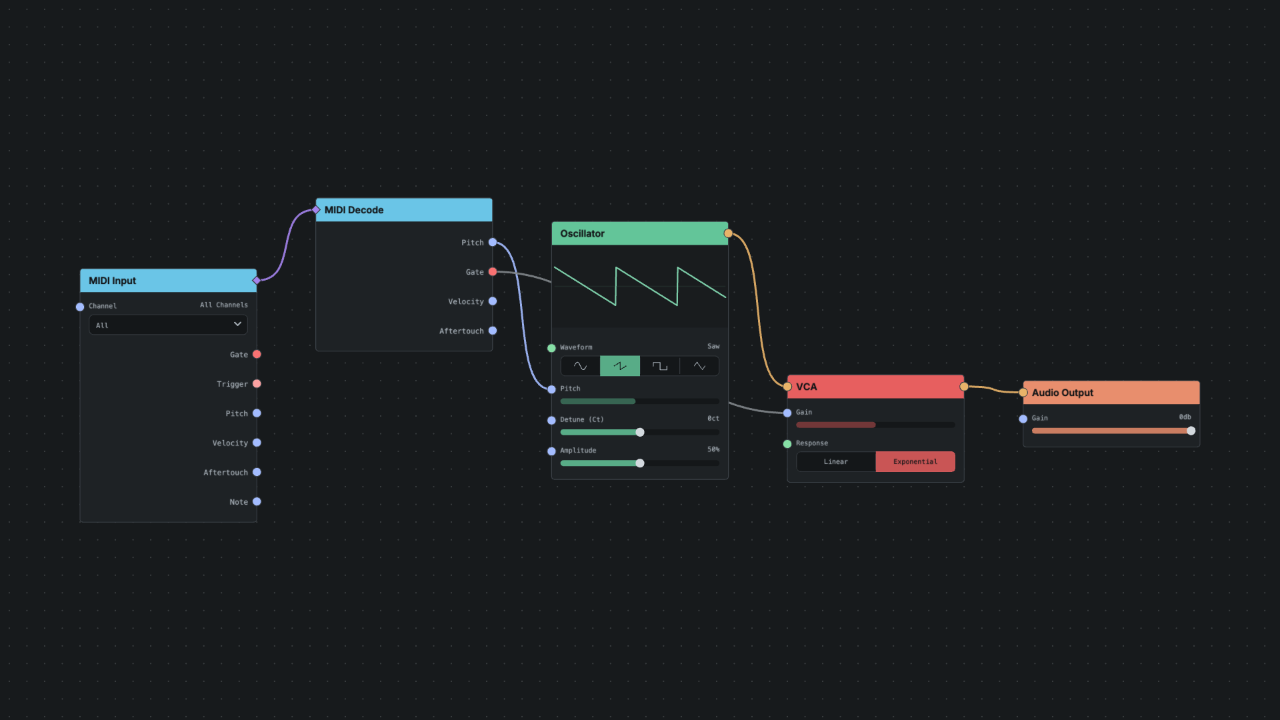
MIDI CC to parameter
- MIDI Input → CC Extractor
- (Optional) Map Range
- Connect to parameter
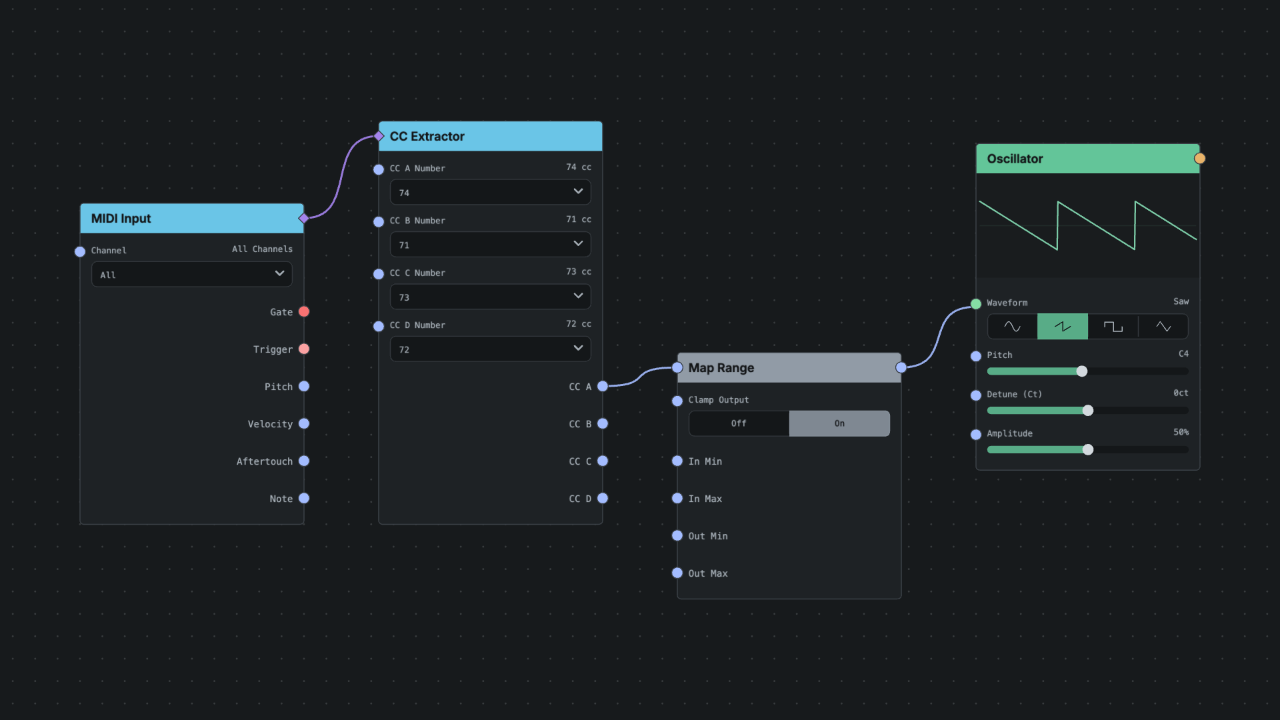
Modulation to parameter range
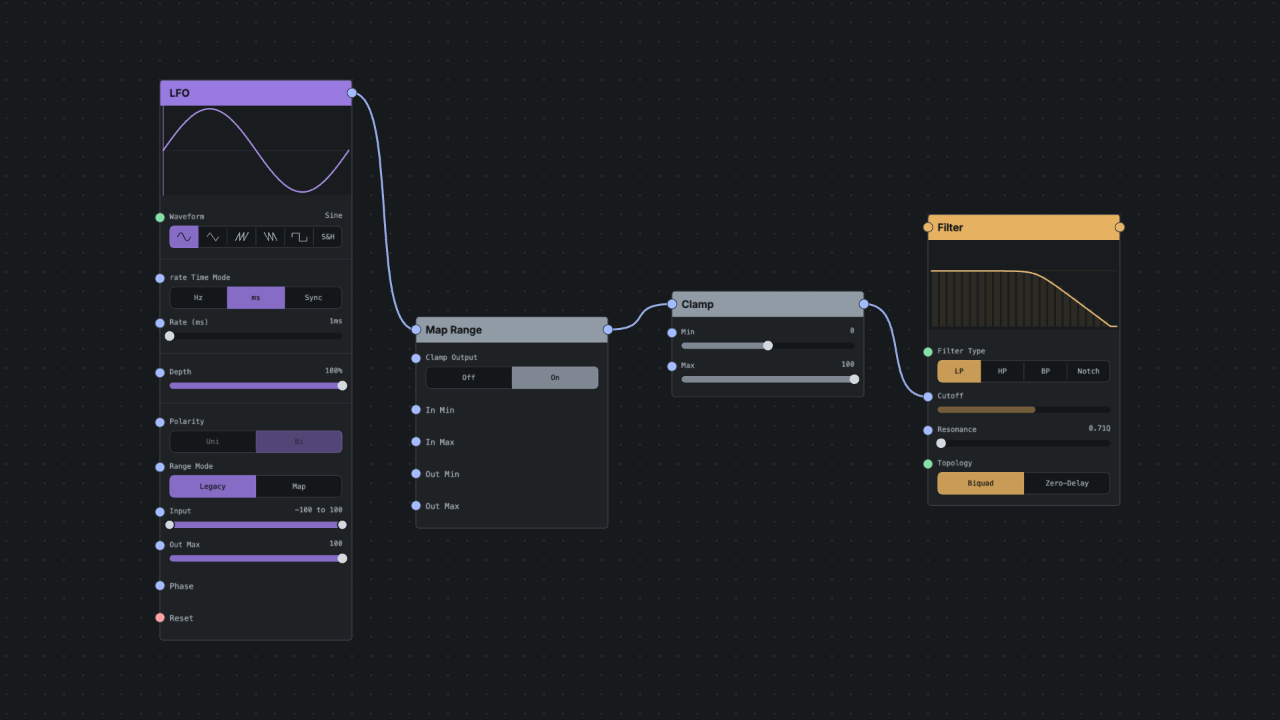
Generate MIDI from signals
- Generate pitch + gate
- MIDI Encode
- Send to MIDI output
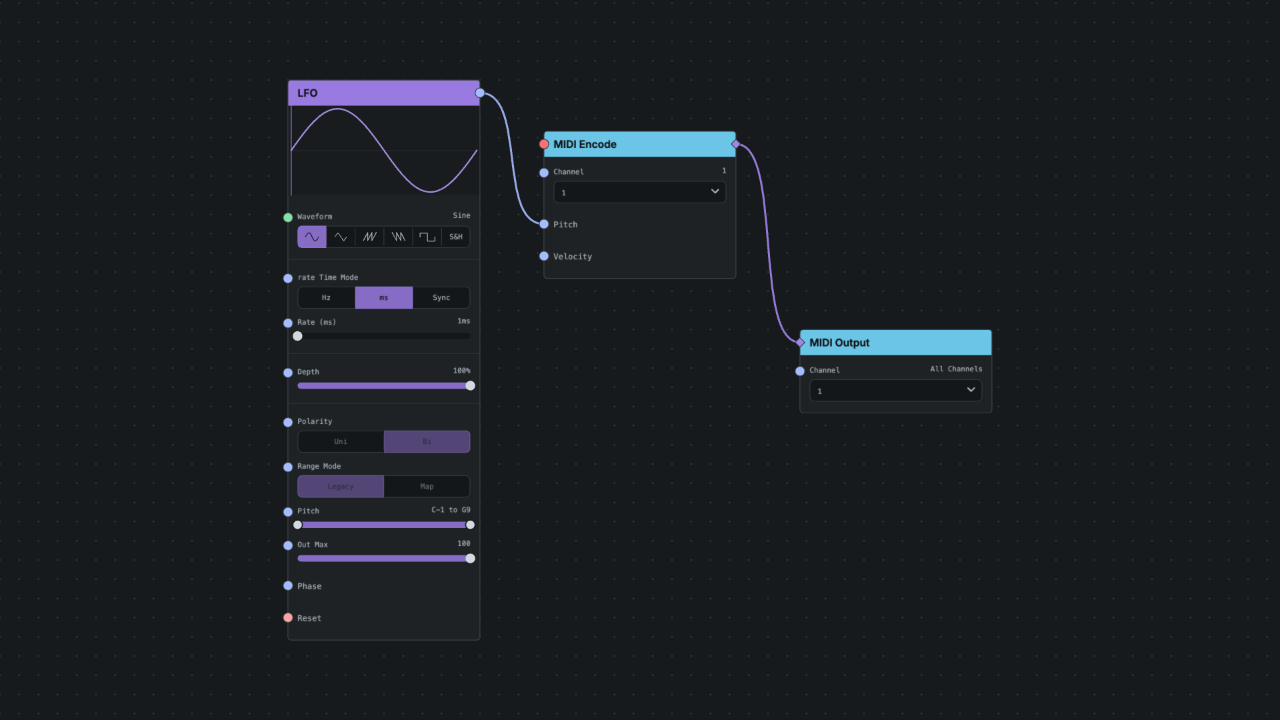
Rules of Thumb
- Match both type and unit
- Treat
controlas “number with meaning” - Normalization is a shared range, not a safety system
- Use explicit conversion when a conversion should be visible or reusable
- Respect ports that forbid coercion
- If something feels unclear, check Kind, Unit, Range, and Coercion