Getting Started
Getting Started
Throughline is a node-based synthesizer. Sound, MIDI, and modulation move through connections between nodes on the canvas.
The Canvas
When you open Throughline you see an infinite canvas where every patch lives. Nodes are the building blocks and cables between them carry signals.
Zoom with the scroll wheel or trackpad pinch. Pan by scrolling with a trackpad, dragging with the middle mouse button, or pressing P for the Pan tool and dragging (A switches back to the Select tool). Press Home to fit the visible patch back into view.
Adding Your First Nodes
Press Shift+A or Cmd+K to open the Node browser. Type to search, then press Enter or click a result to place the node.
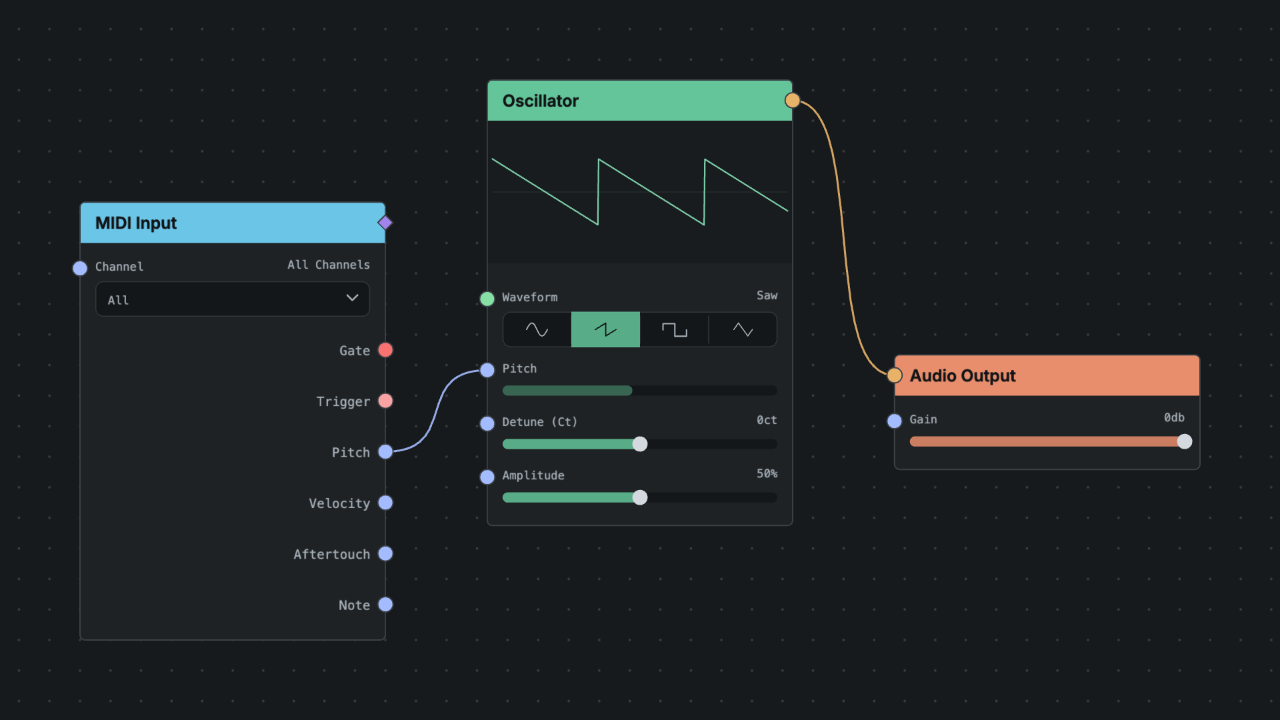
For a basic synth patch add:
Making Connections
Ports on the left are inputs. Ports on the right are outputs. Drag from an output port to an input port to create a cable.
For the basic patch:
- Connect MIDI Input MIDI Out to Oscillator Pitch. The Pitch port accepts MIDI directly and reads the incoming note.
- Connect Oscillator Signal to Audio Output Audio In.
Your DAW host routing reaches MIDI Input automatically when the plugin is inserted on a MIDI-capable track.
Playing and Adjusting
Press Space to start the transport in browser mode. Play from your DAW, from a MIDI controller, or with Piano Mode using Shift+P.
Click a node to inspect it. Parameters appear in the inspector on the right. Try changing the Oscillator waveform or add a Filter between the oscillator and the output.
Saving Your Work
Plugin sessions save with the host project. Use patch import and export when you want a separate file copy for sharing or backup.