Math and Logic
Math and Logic
Math and logic nodes help you turn raw signals into useful patch behavior.
Use math nodes when you want to scale, offset, constrain, or remap numbers. Use logic nodes when you want conditions, gates, triggers, state, or simple switching.
Most of these nodes work on control-style signals rather than audio. They are best for modulation, thresholds, timing, and decision-making.
Math Nodes Work On Raw Numbers
Math nodes treat their inputs as numbers. They do not preserve musical meaning automatically.
- Adding a pitch signal applies a numeric offset in that pitch domain.
- Multiplying pitch, MIDI-note, gate, or trigger signals changes raw magnitude, not musical intent.
- Map Range and Clamp are usually safer than ad hoc scaling when a destination expects a specific range.
If the meaning of a signal changes, convert it first. Then use math nodes to scale or offset it.
Core Math Jobs
Add and subtract
Use Add and Subtract to create offsets and bias values.
Good uses:
- Push an LFO above or below a centre point
- Add envelope amount on top of a base value
- Transpose an already-pitch-domain control signal by a fixed amount
Multiply and divide
Use Multiply and Divide to scale a signal up or down.
Good uses:
- Control modulation depth
- Reduce the strength of an envelope
- Build simple ratio-style scaling
Be careful with pitch, MIDI-note, gate, and trigger signals. These nodes do raw math, not musically aware transforms.
Minimum, maximum, power, and modulo
Use:
- Minimum to keep the lower of two values
- Maximum to keep the higher of two values
- Power to bend response curves
- Modulo to wrap repeating numeric patterns
These are useful when a simple add or multiply is not enough.
Clamp and map range
Use:
This is one of the most common utility patterns in Throughline. If a source gives you 0 to 1 but the destination is useful between 200 Hz and 2000 Hz, Map Range is the clean way to bridge them.
Logic Turns Signals Into Decisions
Logic nodes interpret zero as false and nonzero as true unless the node documentation says otherwise.
Use logic when you want:
- a gate only when a condition is true
- a trigger when something changes
- a latched on/off state
- a controlled choice between two signals
Core Logic Jobs
Compare
Use Compare to test two control signals.
It gives you:
- a
gateoutput for the current comparison result - a
changedtrigger when that result flips
This is the right node when you want threshold behavior such as "open only when above this value."
AND, OR, XOR, and NOT
Use AND, OR, XOR, and NOT to combine or invert conditions.
These are useful for:
- combining multiple gate requirements
- blocking one condition while another is active
- building simple decision trees from control or gate signals
Edge detector
Use Edge Detector when you want triggers from change instead of a held state.
It gives separate rising and falling triggers from a nonzero signal. This is useful when a gate should fire something once on transition instead of staying high.
Toggle and manual trigger
Use Manual Trigger to fire a one-shot trigger by hand.
Use Toggle to latch a repeating trigger stream into a persistent state.
Toggle gives you:
- a
gateoutput for on or off state - a
valueoutput as0or1control
That makes it useful for mute states, mode changes, and simple on or off control.
A/B switch
Use A/B Switch to choose between two control signals with a nonzero select input.
This is useful when you want one modulation source sometimes and another source at other times without rewiring the patch.
Common Patch Examples
Scale an LFO before it hits a parameter
- Start with LFO.
- Send it through Multiply with a depth control.
- If needed, add a bias with Add.
- Send the result to the destination parameter.
This makes modulation amount explicit instead of hiding it inside the destination node.
Turn a threshold into a gate
- Start with a changing control source.
- Compare it against a reference using Compare.
- Use the gate output to drive another logic or modulation step.
- Use the changed output when you need a one-shot event on crossing.
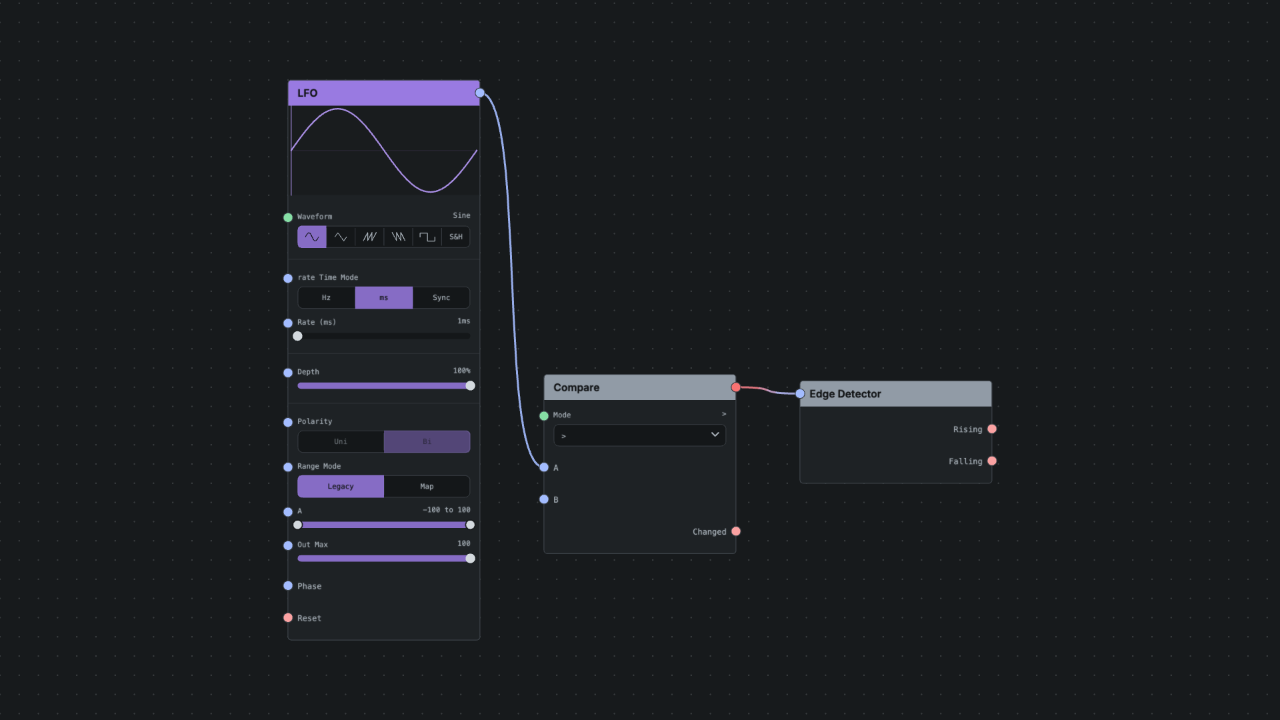
Create a one-shot from a held state
- Start with a gate or any nonzero control signal.
- Send it to Edge Detector.
- Use the rising or falling output wherever a trigger is required.
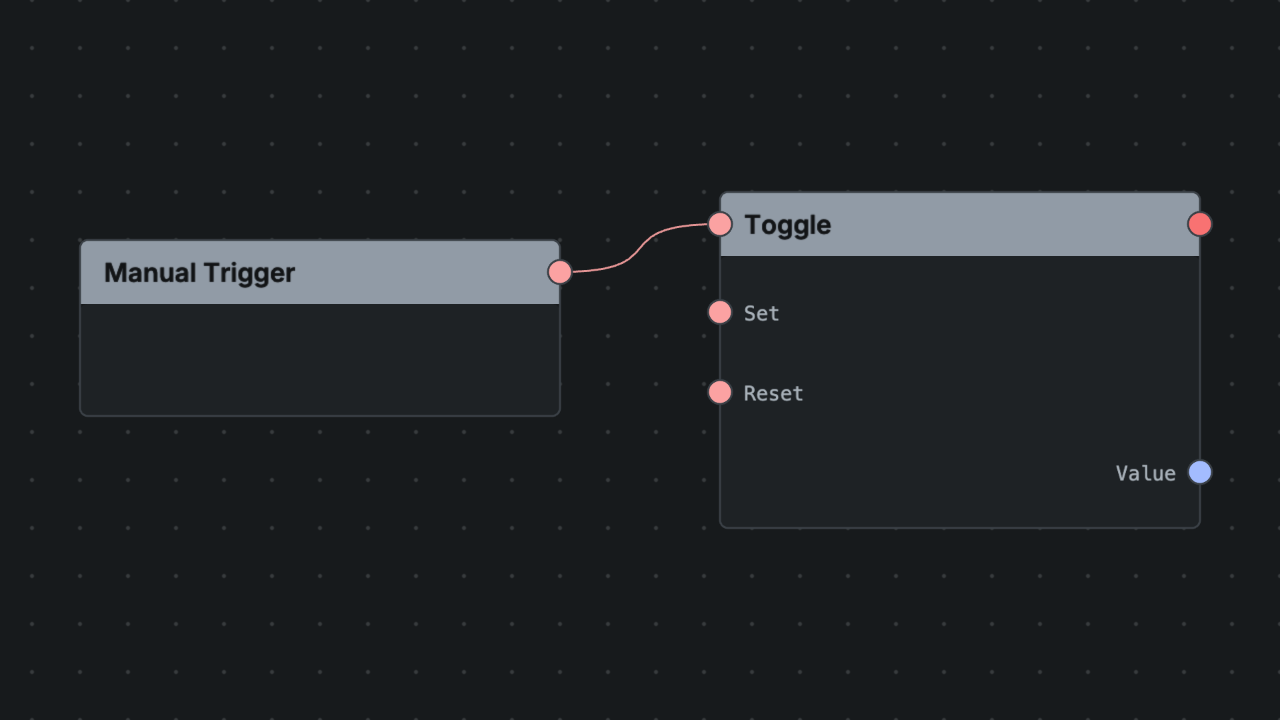
Latch a button press into on or off state
- Use Manual Trigger or any trigger source.
- Send it to Toggle.
- Use
gatefor boolean routing orvaluewhere a0/1control signal is more useful.
Remap a controller into a useful range
- Start with a normalized control source such as CC Extractor.
- Use Map Range to translate it into the destination range.
- Add Clamp if the destination should never exceed fixed bounds.
Rules of Thumb
- Use math nodes for numbers, not for guessing musical meaning.
- Use logic nodes when a patch needs conditions, thresholds, or state.
- Treat nonzero as true when working with logic unless the node docs say otherwise.
- Use Compare when you need a decision, Edge Detector when you need a trigger from change, and Toggle when you need memory.
- Use Map Range and Clamp when a destination expects a particular range.
- If a signal's meaning changes, convert first and do math second.