 Strangelight Audio
Timing and sync
Nothing in a Throughline patch follows tempo on its own. A node plays in time only when a Clock is wired to it, directly or through a Clock Divider. Without that cable, a delay uses milliseconds and an LFO uses hertz.
Sync a delay
A Delay has two ways to set its Time:
- Free time: set Time in milliseconds. The echoes keep that spacing whatever the tempo.
- Synced: connect a Clock Divider to the Time input. The control then shows the division, such as 1/4, and the echoes follow the tempo.
To sync a Delay:
- Add a Clock if the patch has none, and set its Source to Host.
- Drag from the Clock's Clock output to empty canvas and choose Clock Divider.
- Set the Divider's Division and Type, for example 1/4 and Note.
- Connect Clock Divider Clock to Delay Time.
The quickest route is to add Delay (1/4 synced), Delay (1/8 synced) or Delay (1/16 synced) from the node browser. Each adds a Delay with a Clock Divider and connects them to the patch's Clock, adding a Clock if there is none.
| Free time: 300 ms | Synced: Clock → Clock Divider (1/4) → Time |
|---|---|
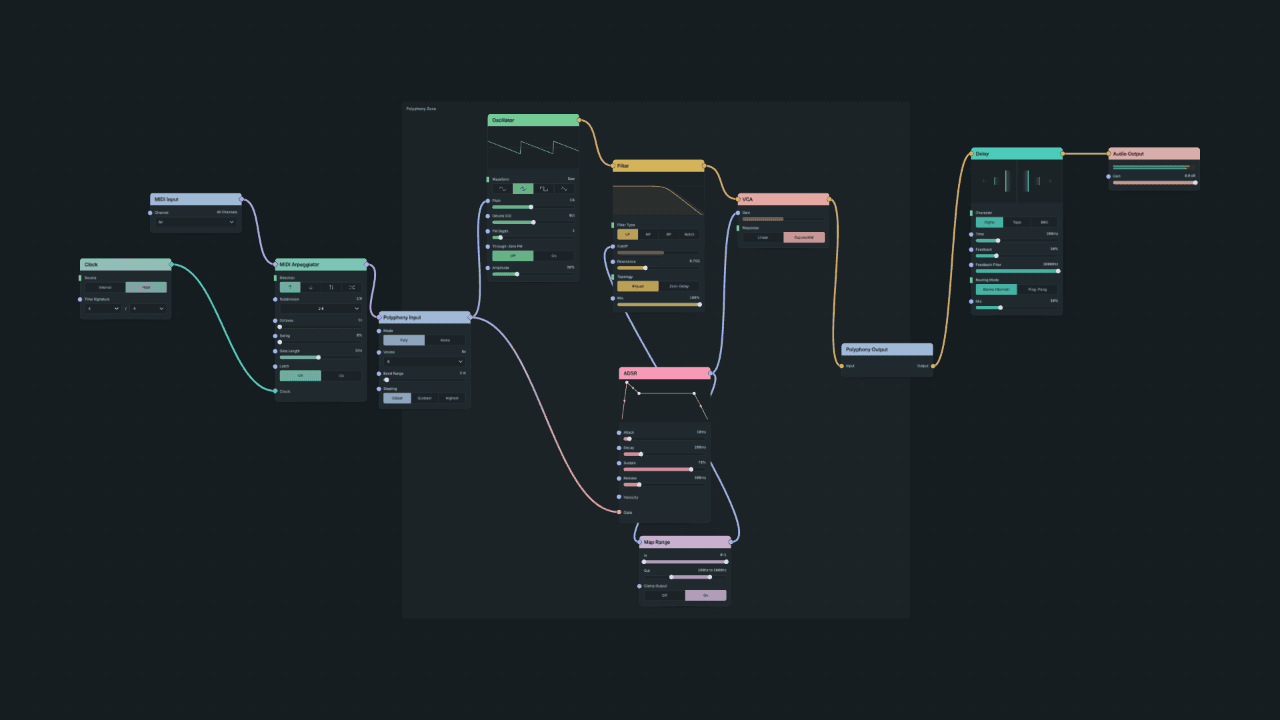 |
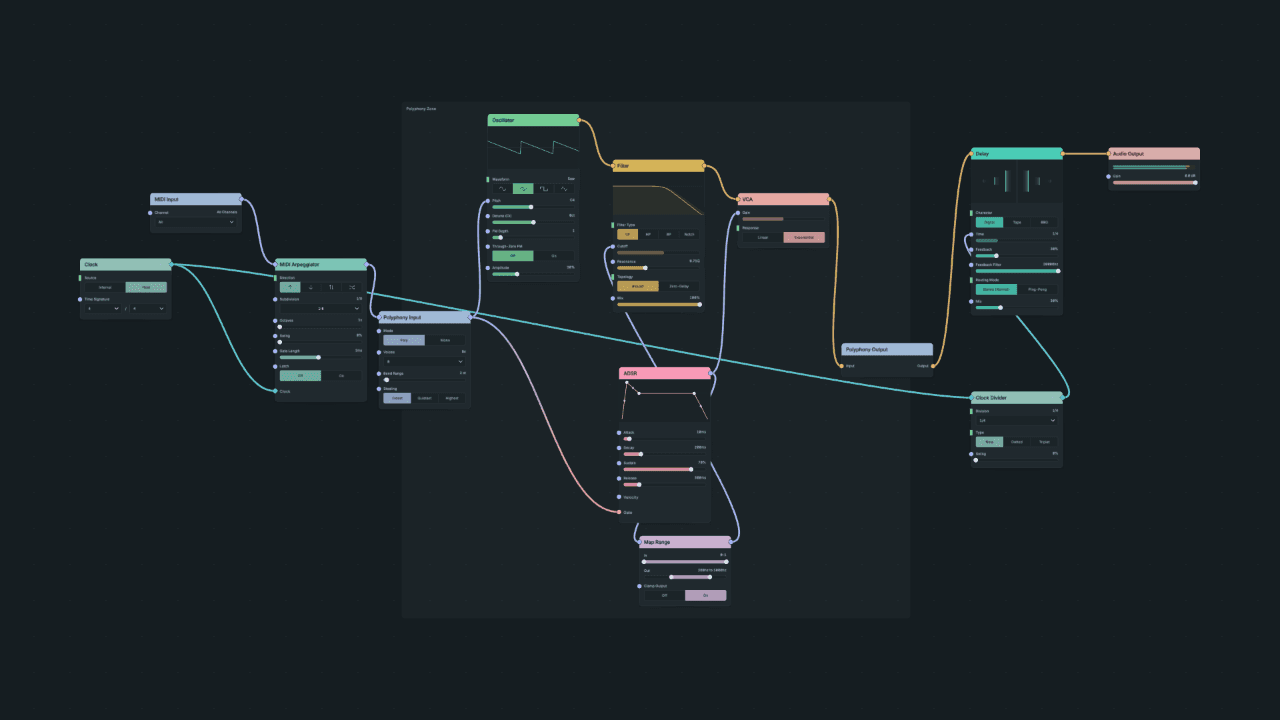 |
A quarter note lasts 60 ÷ BPM seconds: 0.5 s at 120 BPM and 0.667 s at 90 BPM. An eighth note lasts half as long. Build a synth walks through both versions.
Sync LFOs and other rates
The same pattern works for any timing input that accepts a Clock. One Clock can drive several nodes at different divisions:
Diagram as text
Clock, Source Host connects to Clock Divider 1/4 via Clock. Clock, Source Host connects to Clock Divider 1/16 via Clock. Clock Divider 1/4 connects to Delay via Time. Clock Divider 1/16 connects to LFO via Rate.
graph LR
    CLOCK[Clock, Source Host] -->|Clock| DIV1[Clock Divider 1/4]
    CLOCK -->|Clock| DIV2[Clock Divider 1/16]
    DIV1 -->|Time| DLY[Delay]
DIV2 -->|Rate| LFO[LFO]- LFO, Shaper and Chorus Rate: one cycle per division.
- Granular Delay: its documented timing controls, described on its reference page.
- Ramp and Function in Clock time mode: segment lengths in clock units.
Use one Clock Divider per division. Several nodes can share one Clock and still run at different divisions. Each node's reference page describes its exact clocked behaviour; they do not all respond the same way to stopping or relocating.
Where tempo comes from
The Clock's Source chooses its tempo:
| Source | Tempo comes from | Starts and stops with | Use it when |
|---|---|---|---|
| Host | Your DAW's tempo | Your DAW's transport | The patch should stay locked to the project |
| Internal | The Clock's BPM | The Clock's Transport button | You want timing independent of the DAW |
When the editor adds a Clock for you, check its Source: set it to Host to follow your DAW. The Init patch's Clock already uses Host.
When playback stops
With Source set to Host:
- While the DAW plays, the Clock follows the project position and tempo.
- When the DAW stops, sequencers and arpeggiators start no new notes. The Clock reports that the transport is stopped.
- Synced delays and modulation keep running at the current tempo while the DAW is stopped, so a tempo change is heard straight away.
- When the DAW starts again, the Clock resets and lines up with the project position.
If the host supplies no transport at all, Host Unavailable decides what happens: Idle stays silent and Use Internal Tempo runs at the Clock's own BPM.
With Source set to Internal, the Clock runs from BPM and starts and stops with its Transport control. Its optional inputs add control:
- Run is a gate. A high gate can start Internal playback; a low gate freezes the Clock's phase. It has no effect on a Host Clock.
- Reset is a trigger that restarts the Clock's phase.
- BPM accepts a cable, so tempo itself can be modulated.
Sequencers and arpeggiators
MIDI Arpeggiator, Step Sequencer and Euclidean Sequencer play only from a wired Clock. When you add one, the editor connects it to an existing Clock, preferring a Host Clock, or adds an Internal Clock and connects it. A sequencer in an imported patch with no Clock stays silent until you connect one; its node shows a warning until then.
Choose the rhythm on the sequencer itself, with Subdivision or its pattern controls. A Clock Divider between the Clock and a sequencer changes the interval that drives it.
Swing on Step Sequencer, MIDI Arpeggiator, MIDI Delay, MIDI Ratchet and Clock Divider stretches every interval by the same amount, up to 50%. It does not alternate long and short steps.
MIDI Delay and MIDI Ratchet
MIDI Delay and MIDI Ratchet are exceptions. In tempo-sync mode they fall back to your DAW's tempo when their Clock input supplies no usable movement, including when nothing is connected. The editor does not connect a Clock when you add them. Wire a Clock or Clock Divider for explicit timing. Their fallback does not make sequencers without a Clock play.
External MIDI clock and clock facts
- MIDI Clock turns incoming MIDI clock messages into a Clock signal. Connect MIDI Input to it when your host or external gear sends MIDI clock. Notes alone do not provide a clock.
- Clock Decode reads a connected Clock and outputs its BPM, playing state, bar and beat position, time signature, reset and availability, for use elsewhere in the patch.
If timing is wrong
| Symptom | Likely cause | Fix |
|---|---|---|
| A sequencer only plays while the DAW plays | Clock Source is Host | Expected. Use Internal to play without the DAW transport. |
| Silent with no DAW transport available | Host Clock with Host Unavailable set to Idle | Set Source to Internal, or Host Unavailable to Use Internal Tempo. |
| An Internal Clock does not run | Its Transport is stopped | Start the Clock's Transport. |
| A delay or LFO ignores tempo | No Clock or Clock Divider wired to its Time or Rate | Connect one. See Sync a delay. |
See also Not following tempo.