 Strangelight Audio
Modulate a parameter
Modulation moves a parameter while you play. Every modulation patch has three parts:
- A source that moves: an LFO, an envelope, a drawn shape or a random value.
- A destination: a parameter input on another node, such as Filter Cutoff.
- A range that suits the destination: how far, and between which values, the parameter moves.
The range is the part most patches get wrong. Sources move between 0 and 1, or −1 and +1; destinations expect hertz, milliseconds or a note number. Map Range sits between them and sets the range.
Sweep a filter with an LFO
- Add an LFO. Set Polarity to Uni, so it moves from 0 to 1, and Rate to 0.5 Hz.
- Drag from the LFO Signal output to empty canvas and choose Map Range.
- Connect Map Range Result to Filter Cutoff.
- On Map Range, set Out to 300 Hz to 3000 Hz. Leave In at 0–1, which matches the LFO.
Connect Map Range before you set Out. Its first destination decides the unit of Out, here hertz, and replaces any range you entered earlier.
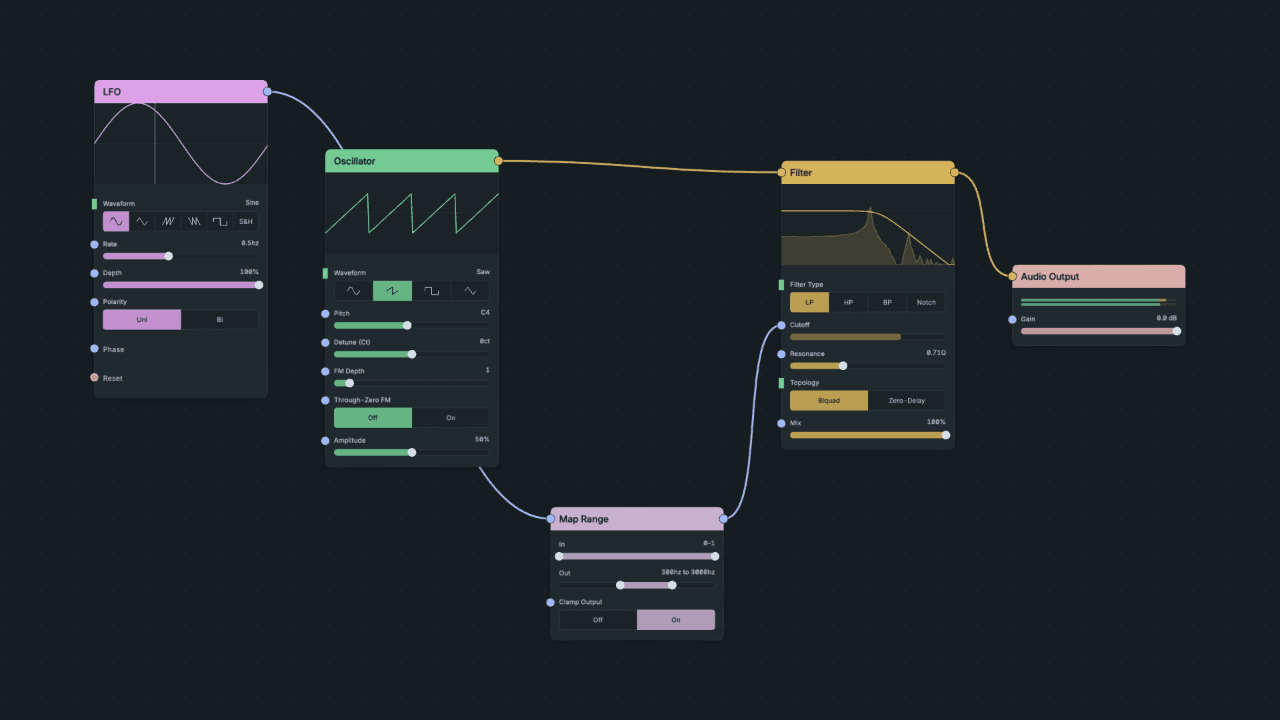
Result: the filter opens from 300 Hz to 3000 Hz and back every two seconds. The Cutoff slider stops responding to your mouse, because the cable now sets it.
To change how far the sweep goes, change Map Range Out. To change its speed, change LFO Rate. Depth on the LFO scales the movement before Map Range, so with Map Range in place, leave Depth at 100% and set the range on Map Range.
Choose the polarity
- Unipolar (0 to 1) only rises from a base value. Use it when the parameter should start at one end of the range, as in the filter sweep above.
- Bipolar (−1 to +1) swings above and below a centre. Use it for vibrato or pan, and set Map Range In to −1 to 1 so the centre of the swing lands on the centre of your range.
Choose a source
| Movement you want | Source |
|---|---|
| A shape that follows each note | ADSR |
| A repeating cycle | LFO |
| A repeating shape you draw | Shaper |
| One move from a start to an end value | Ramp |
| A drawn multi-point envelope | Function |
| A new value each time something triggers | Random, Sample & Hold |
| Smoother versions of a jumpy signal | Slew Limiter, Glide |
A node's reference page lists its controls and display gestures.
Common patterns
Per-note filter movement
Send an ADSR Envelope through Map Range into Filter Cutoff, as in Build a synth. One envelope can drive both the VCA and the filter.
Stepped random values
Feed Sample & Hold a moving source, such as noise or an LFO, and trigger it from a clock or a second LFO. It holds a new value on each trigger. Send the result through Map Range into the destination.
Diagram as text
Clock / LFO connects to Sample & Hold via Trigger. Changing source connects to Sample & Hold via Input. Sample & Hold connects to Map Range via Held value. Map Range connects to Destination via Result.
graph LR
    TRIG[Clock / LFO] -->|Trigger| SH[Sample & Hold]
    SRC[Changing source] -->|Input| SH
    SH -->|Held value| MAP[Map Range]
    MAP -->|Result| DEST[Destination]
Portamento
Put Glide between MIDI Decode Pitch and Oscillator Pitch. Notes slide to their new pitch instead of jumping. Slew Limiter does the same with separate rise and fall times.
Modulating inside a Polyphony Zone
Connect a modulation source to a node inside a Zone and the Zone adopts the source: each voice gets its own copy, with its own cycle. To move every voice together, modulate a node after the Zone instead, such as a filter on the mixed output. See Polyphony.
Sync modulation to tempo
LFO and Shaper Rate run in hertz until you connect a Clock to them. See Timing and sync.
Control parameters by hand or from your DAW
To move a parameter with a dial, or automate it from your DAW, assign it to a Macro. To read a MIDI controller, see the CC example in Connections and sockets.