 Strangelight Audio
1.4.3. Lesson 3: Play chords
At this point the synth has one voice, so it plays one note at a time. A Polyphony Zone (see Polyphony) runs a separate copy of the voice for each held note.
Decide which nodes belong to one note. Here that is everything from MIDI Decode to VCA: MIDI Decode, Oscillator, Filter, ADSR, Map Range and VCA. MIDI Input and Audio Output stay outside, because all voices share one note stream and one output.
Starting checkpoint: build-a-synth-shaped-voice.tlpatch
- Click MIDI Decode, then Shift-click the other five voice nodes.
- Open a selected node's context menu and choose Create Polyphony Zone. Or press Shift+A and search for the command.
- If the shaded Zone frame covers Audio Output, drag Audio Output to the right until it sits outside the frame.
- On Oscillator, set the Amplitude slider to 30%.
When you create the Zone, Throughline replaces MIDI Decode with the Zone's Polyphony Input. It sends Pitch and Gate to each voice. Polyphony Output on the right side adds the voices together and sends them on to Audio Output.
The frame follows cables, not position, so moving Audio Output only tidies the picture. If you later connect a new node into one of the voice's inputs, the Zone adopts it. The node becomes part of the voice and runs once per note. See Add nodes, edit live, remove a Zone.
Every voice adds to the output level, so lowering the Oscillator's Amplitude leaves headroom for chords. At 50%, a three-note chord clips the output.
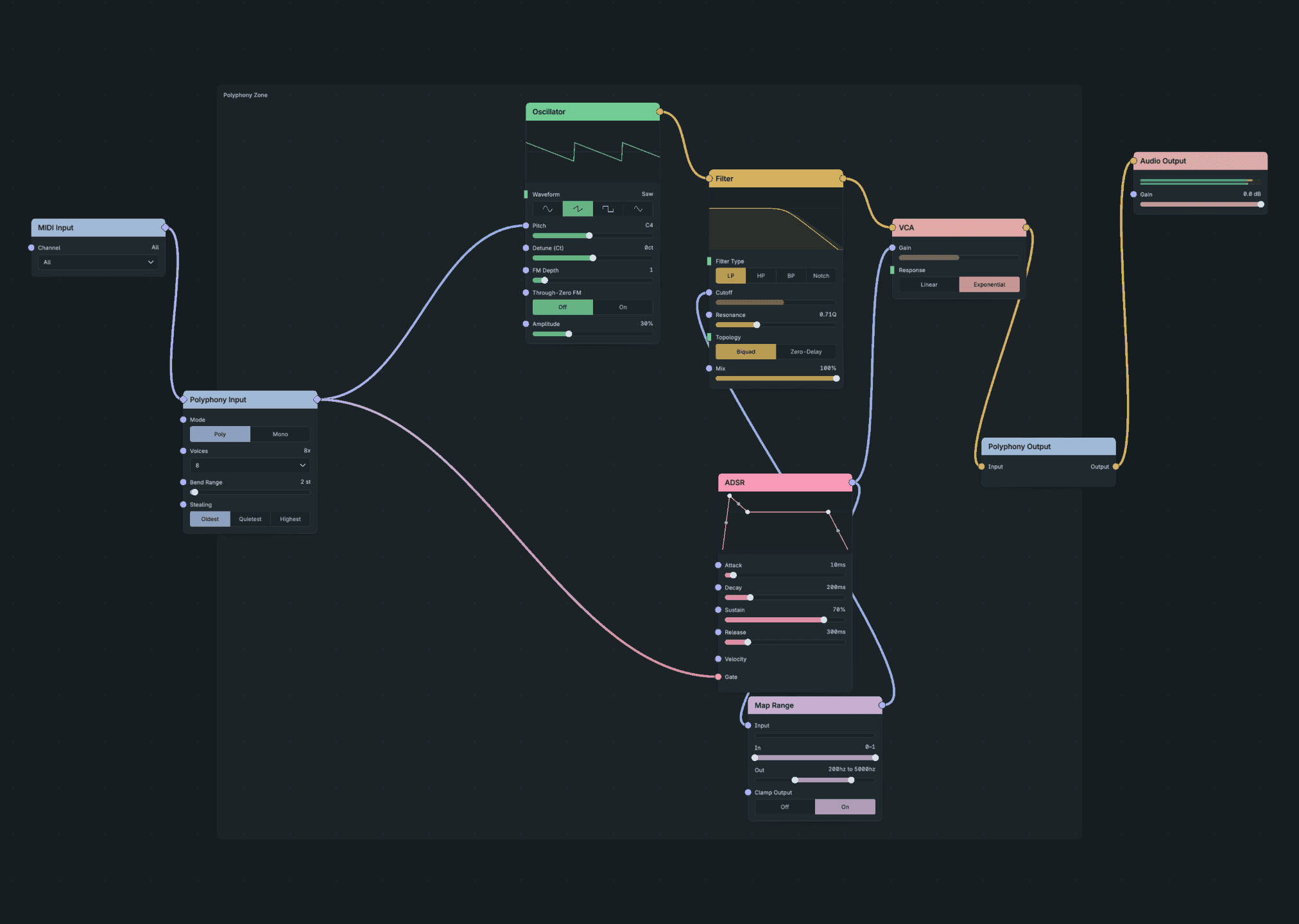
The Voice in a Polyphony Zone.
Result: play a chord. Each note has its own envelope and filter sweep. Release one key and the other notes keep sounding. The Zone plays up to eight notes at once; change Voices on Polyphony Input for more or fewer.
If Create Polyphony Zone is missing: the usual cause is a selected node that receives audio from outside the selection. A Zone accepts notes, not audio. Select only the six voice nodes and repeat the steps.
Checkpoint: build-a-synth-polyphonic.tlpatch
You now have a working synth. Save your DAW project. The next two extensions are optional.