 Strangelight Audio
3.5.1. Make a voice polyphonic
A Polyphony Zone runs one voice for each note. The cables decide which nodes run per voice and which process the mixed output.
If you already have a working voice, wrap it:
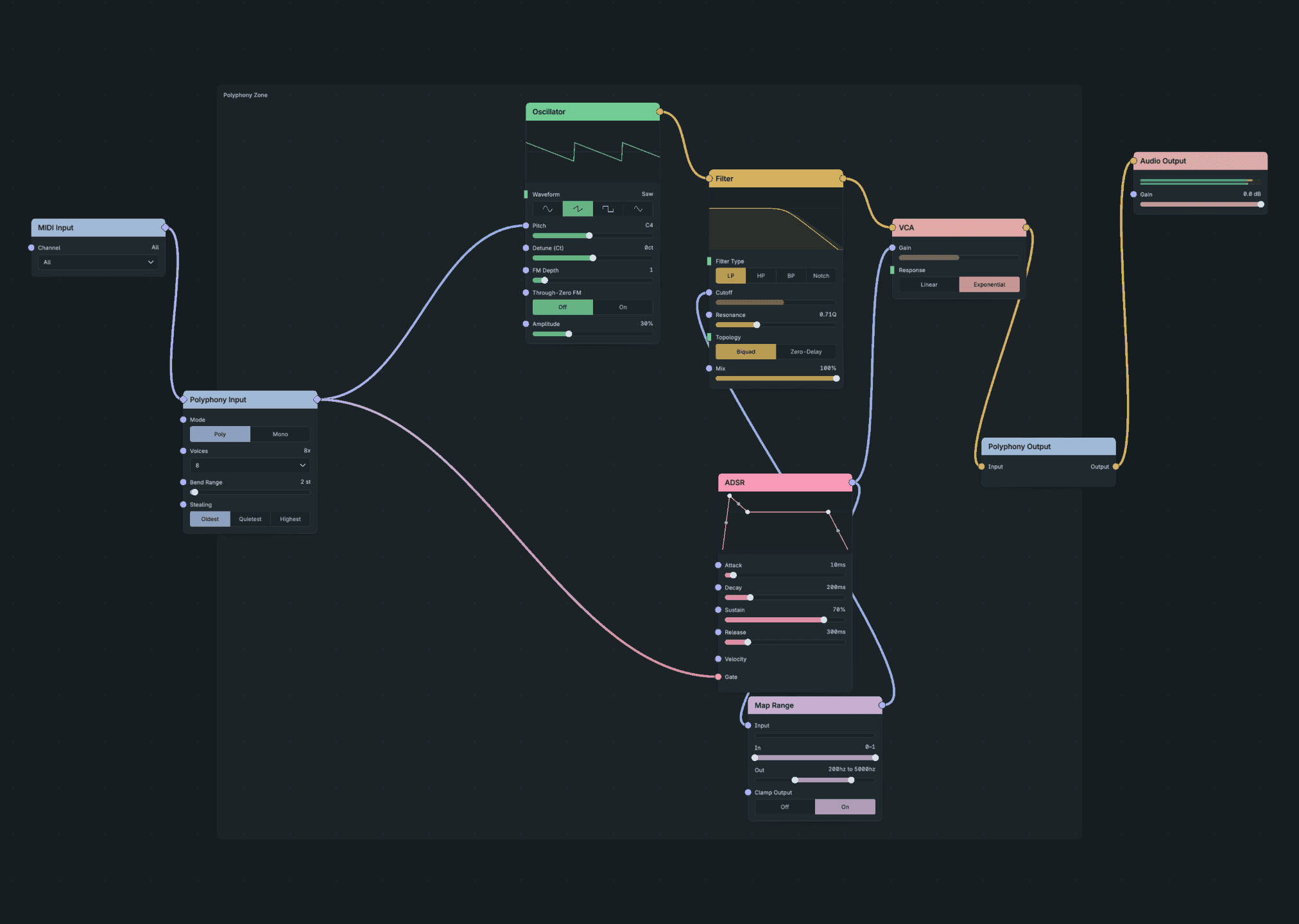
Make A Voice Polyphonic.
- Select the nodes that make one note, such as MIDI Decode, Oscillator, Filter, ADSR and VCA. Leave MIDI Input and Audio Output out of the selection.
- Right-click a selected node and choose Create Polyphony Zone, or press Shift+A and search for it.
- Check the boundary: MIDI enters the Zone at Polyphony Input and audio leaves through Polyphony Output.
A selected MIDI Decode is replaced by Polyphony Input, which supplies each voice's Pitch and Gate. The whole change is one undo step. Lesson 3: Play chords walks through it.
To start from nothing, add Polyphony Zone from the node browser and place it. Connect MIDI Input to the Zone's MIDI input, build the voice inside, and connect Polyphony Output to Audio Output.
Result: the routing and controls match the procedure above.