 Strangelight Audio
6.2. Signal kinds and units
Signal kind describes what a cable carries; unit and range describe its numerical meaning. See Read what a cable carries for the practical checks.
6.2.1. Socket shapes and colours
Each socket's shape and colour show its kind. The names beside these icons name the signals they carry. On the canvas, pause the pointer on a socket. Help opens as a tooltip beside the pointer and shows the socket's signal.
 | Audio | Full-band audio signal |
 | Control | Normalized control/CV signal for parameter modulation |
 | String | String-backed enum value |
 | Gate | Gate signal (0/1) |
 | Clock | Musical phase clock signal |
 | Time Signature | Musical meter carried as numerator and denominator |
 | Trigger | Trigger pulse |
 | MIDI | MIDI note/CC data |
 | Scale | Musical key and scale selection |
 | Number | Control/parameter value |
 | Event | Discrete pulse/clock/gate |
 | Sequence | Timed step sequence with values and durations |
 | Boolean | Boolean/toggle |
 | Buffer Audio | Audio buffer |
 | Buffer FFT | FFT buffer |
 | Unknown | Unconnected wildcard input; adopts the connected signal type |
6.2.2. Signal type reference
Every signal kind that can flow between sockets, with its normalised range and unit hint. This table comes from the same vocabulary as the editor's socket details.
| Name | Range | Meaning |
|---|---|---|
| Audio | -1 to 1 | Full-band audio signal |
| Control | 0 to 1 normalized | Normalized control/CV signal for parameter modulation |
| String | catalog-defined | String-backed enum value |
| Gate | 0 or 1 | Gate signal (0/1) |
| Clock | beats from clock origin | Musical phase clock signal |
| Time Signature | positive numerator / power-of-two denominator | Musical meter carried as numerator and denominator |
| Trigger | 0 or 1 | Trigger pulse |
| MIDI | 0-127 | MIDI note/CC data |
| Scale | catalog-defined | Musical key and scale selection |
| Number | 0-1 (unipolar) | Control/parameter value |
| Event | 0 or 1 | Discrete pulse/clock/gate |
| Sequence | varies | Timed step sequence with values and durations |
| Boolean | true/false | Boolean/toggle |
| Buffer Audio | n samples | Audio buffer |
| Buffer FFT | spectrum | FFT buffer |
| Unknown | varies | Unconnected wildcard input; adopts the connected signal type |
Units
Control signals share one kind but carry different meanings depending on their unit:
| Hertz | Frequency in cycles per second |
| Kilohertz | Frequency in thousands of cycles per second |
| Cents | Pitch offset — 100 cents per semitone |
| Semitones | Pitch offset in semitone steps |
| Octaves | Pitch offset in octaves |
| MIDI Note | MIDI note number (0–127, 69 = A4) |
| MIDI Velocity | MIDI note velocity (0–127) |
| MIDI Channel | MIDI channel number (0 = All, 1–16 = one channel) |
| MIDI CC | MIDI continuous-controller value (0–127) |
| Volts per Octave | Pitch CV — one unit per octave |
| BPM | Tempo in beats per minute |
| Beats | Musical position or offset measured in quarter-note beats |
| Milliseconds | Time in thousandths of a second |
| Seconds | Time in seconds |
| Samples | Time in audio samples |
| Decibels | Level in decibels |
| Normalized | Unitless value in a shared normalized range |
| Gain (0–1) | Linear level from 0 (silent) to 1 (unity) |
| Phase (0–1) | Normalized phase across one cycle |
| Pan | Stereo position from left (−1) to right (+1) |
| Degrees | Angle in degrees |
| Q | Filter resonance / quality factor |
| Ratio | Dimensionless ratio between two quantities |
| Percent | Proportion expressed from 0 to 100 |
| Mix (0–1) | Dry/wet blend from 0 (dry) to 1 (wet) |
| Bits | Resolution in bits |
| Grains per Second | Granular density in grains per second |
| Count | Integer count of discrete items |
| Division | Musical time division (e.g. 1/4, 1/8) |
6.2.3. Conversion reference
How Throughline treats mismatched sockets
Each input declares how it accepts other kinds. A connection is one of:
- Direct: the kinds already match.
- Implicit: Throughline converts the signal on the cable. MIDI into a control, gate or trigger input works this way.
- Risky: allowed with a warning badge, because the conversion can lose meaning.
- Forbidden: refused.
Implicit pitch and control conversions happen on the cable, so a direct connection can do the job. Add a conversion node when you want the conversion visible, reusable or shared by two or more destinations:
| To do this | Use |
|---|---|
| Turn MIDI into pitch, gate, velocity, bend | MIDI Decode |
| Read a MIDI controller as a 0–1 value | CC Extractor |
| Switch between Note, Hz and V/Oct pitch | Convert |
| Turn pitch and gate back into MIDI | MIDI Encode |
| Move a signal into another range | Map Range, Clamp |
| Turn a continuous signal into a gate or event | Compare |
| Scale an audio level | Gain, VCA |
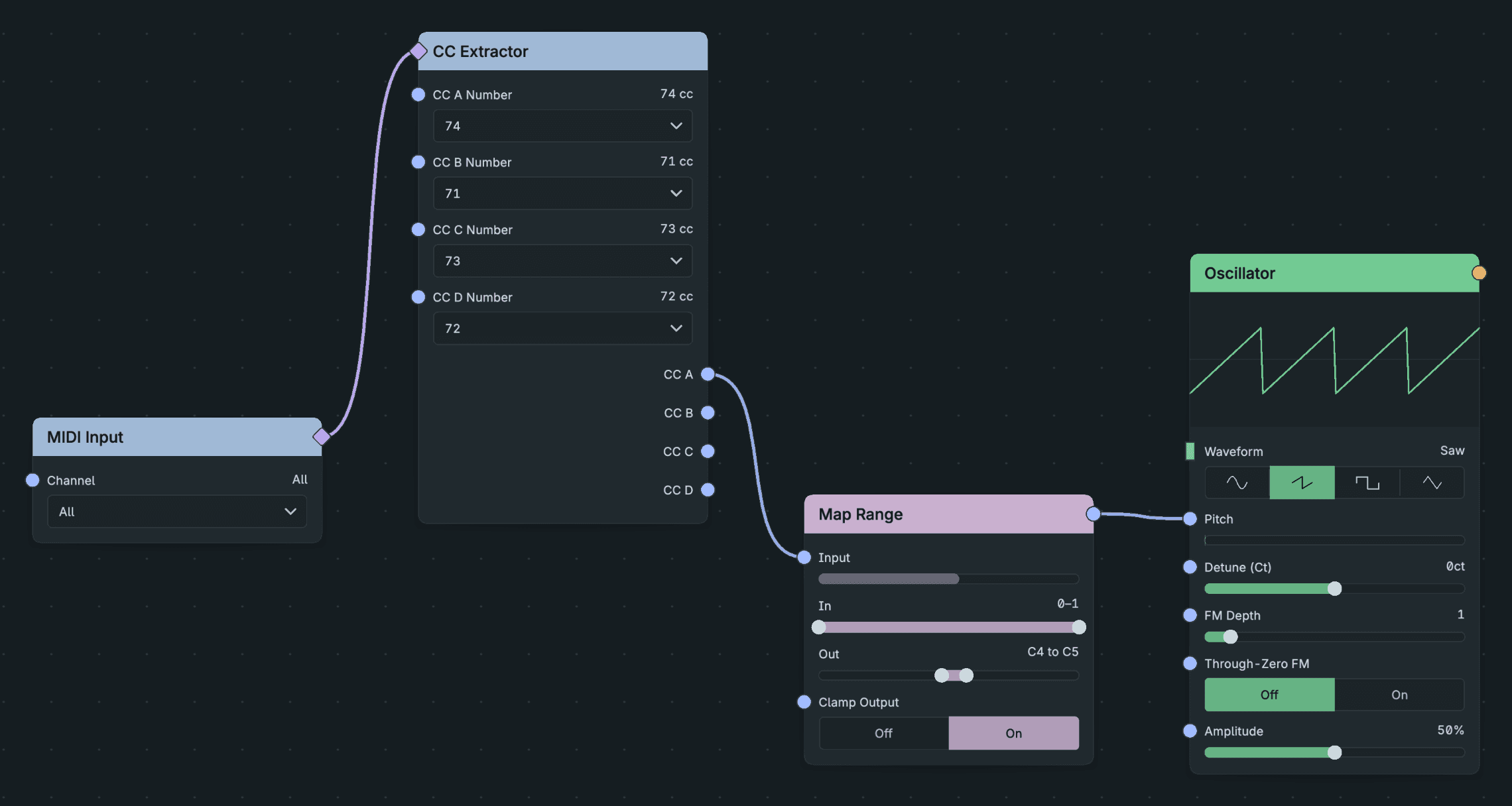
A MIDI controller made audible: CC Extractor reads the controller as 0–1, and Map Range turns it into a pitch range.
Normalised ranges
A normalised range is a shared expected range, not a safety limit. Audio uses a −1 to +1 range by convention, and modulation uses a 0 to 1 or −1 to +1 range. A normalised signal still clips if you amplify it, and Mix adds signals without limiting the result.
Named modes
Mode settings take named values instead of numbers, such as Oscillator Waveform and Filter Filter Type. Choose them on the node. Numbers and control signals do not convert into named modes.
Gates and triggers
A gate is a held on/off state, such as a held key. A trigger is a one-moment event, such as the Trigger output of MIDI Decode or the Reset input of a Clock. Use a gate for anything that lasts and a trigger for anything that happens once.